Free WordPress Theme: Zexee
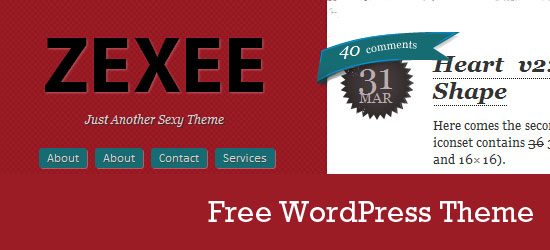
Zexee is a free, two column WordPress theme originally based on The Design Superhero‘s previous design.
This theme was designed with the main focus being on typography and a unique look. The theme is released especially for Six Revisions readers.
The theme is provided to users under the open source GNU General Public License.
Previews
Here are some screenshots of Zexee.
Front page

Post headline

Sidebar

Threaded comments

Demo
- You can see the functional live demo of Zexee on The Design Superhero.
Download
- zexee (ZIP, 0.31 MB)
Related Content
- Optimizing WordPress for Search Engines
- 50 Beautiful Free WordPress Themes
- 15 Useful Tools for WordPress Bloggers
- Related categories: Freebies and WordPress
About the Author
 Aravind Ajith is a User Interface Designer and Web Developer with over 6 years of experience in the field. He is also the founder of the design blog The Design Superhero. He is currently working for Vindzer, his own web development studio. Catch up with him on Twitter and Facebook.
This was published on Jan 21, 2010


56 Comments
stoke Jan 21 2010
Very nice WordPress theme. clean and simple using colours not used too much together on the web. Unique, nice :)
Jacques van Heerden Jan 21 2010
Really really neat Theme, Great minimalism as well.
Keep up the great work bro.
Cheers
Jacques
Iliyan Petrov Jan 21 2010
iNcredible. Really nice one.
Callum Chapman Jan 21 2010
Great theme Aravind!
Inspiring Pixel Jan 21 2010
Nice theme Aravind. Keep it up!
sriganesh Jan 21 2010
wow great buddy nice work , i like the button pressing style. good going :D and the border above the header is cool 8)
Marcell Purham Jan 21 2010
Very nice. Theme looks great!
Michel Morelli Jan 21 2010
When I will have time I want to port this theme to Drupal. Can I ?
Bharani M Jan 21 2010
Great theme! Thanks for sharing this theme.
Deepu Balan Jan 21 2010
Nicely done Aravind! Good work.
-Deepu
Oscar Martell Jan 21 2010
This is a great theme. Thanks for sharing !
Tom Ross Jan 21 2010
Great design. I really like what you’ve done with the comment/date area.
Soner Gönül Jan 21 2010
Wow Nice Theme
Thanks !
Cool..
Fink About It Jan 21 2010
Wow! It does look sexy. Congrats!
aravind Jan 21 2010
@all I’m glad you liked it. :)
Looking forward to more comments..
Jamie Jan 21 2010
Excellent theme! But how do i get the theme to show comments on an blog post page? It just says “2 Awesome Responses” :S
Ralf Jan 21 2010
very simple. doesn’t look that good without the big picts. but i like the style…
BigM75 Jan 21 2010
good design of a theme, in the future more funktion please
WDNY Jan 21 2010
Nice Theme..
Things Will only get better when they are under the open source GNU General Public License.
Thanks for sharing.
Adam Jan 21 2010
Really nice theme, i love the threaded comment area. Look so nice!!
Richie Jan 21 2010
It is definitely very zexee!! lol
Thanks aravind!
Kannan Jan 21 2010
Nice theme :)
Roberto Jan 21 2010
Thanks for another good one.
Zoe Feast Jan 21 2010
Love the color combination
cheth Jan 21 2010
Loved the theme.. very unique!… and also the fact that I can see my avatar in the screenshots ;)
Matthew Heidenreich Jan 21 2010
simple and clean, great work.
gweb Jan 21 2010
good templates but blue is more beutiful color on this tape of blog
Black Sand Jan 21 2010
realy good wordpress theme. Thanks for sharing
Black Sand Jan 21 2010
really good theme, thanks for sharing
eric Jan 21 2010
what’s up w/ the h1 font… calibri? is that websafe? do we not care about websafe fonts? if so… damn!!
Justin Moore-Brown Jan 22 2010
Dig this template! Looks good, clean, and I’d assume it’s pretty easy to tweak as well!
Ajay Jan 22 2010
Nice theme! Much appreciated.
viettel Jan 22 2010
Very unique, but it’s only pretty with large images.
Alt Design Jan 22 2010
I’m using FF2 and I don’t see the label of the comment form.
Anyway… good work! Thanks for sharing.
Lenok Jan 22 2010
The theme is great indeed. The only problem is that there is not enoght room for a blog title.
insic Jan 22 2010
cool theme. if im not mistaken this is the previous theme of the designsuperhero site. :)
christopher Jan 22 2010
nice little grungy red theme.
kevin Jan 26 2010
Very nice clean theme – great work dude!
izzat aziz Jan 31 2010
it have a problem when blog title too long [ZEXEE],
but other than that it very much great themes.
Sunil Jain Feb 07 2010
Nice one and the color combination is also good :) :)
Miguel Rodriguez Feb 07 2010
As Izzat aziz commented , if the blog title is too long it gets covered up by the blog entry on the right…..
How do we fix the font size of the Title page for this theme?
THanks
cheth Mar 25 2010
Converted to Blogger theme and also added credits to you guys :) great theme > http://www.chethstudios.net/2010/01/zexee-blogger-template.html
HD Guy Apr 24 2010
Wonderful theme!
Dynun May 03 2010
Really great colors and combination
Highly readable!
Nice nice nice! =)
HELDENTHEATER Jul 20 2010
Great one. Happy to use it on http://heldentheater.com
Problem with Blogtitel too.
Ursala Rose Jul 23 2010
LOVE this theme more than any other free theme EVER! Using it, thank you VERY much!
For all you having trouble with the Header size, edit LINE 106. It’s hard to find, but I found it!
nethead Aug 08 2010
Best themes
Klarisse Sep 03 2010
Thank you! This theme saved my life right now–just installed and about to customize. :)
unwakeable Sep 30 2010
little room in the header section. This can be a problem if your blog has a long blog name/title and if you have many pages to display.Thanks!
Usi Oct 08 2010
this is an over all nice theme, will be even more good if you change this reddish color to some light color.
stoke-on-trent Jan 20 2011
Really nice theme, thanks. Like how it’s clean, yet simple.
Gracie Feb 28 2011
I have a question…how do I hide the subpages? I have about a million of them and it looks awful with them all presented right there on the left. How can I get *only* parent pages to show? Thanks for the beautiful theme — hope I can fix this page problem so I can actually use it! :)
Basil Mar 03 2011
Very very nice theme!
Dan Jul 11 2011
I would like to remove the Digg, Tweet, and Facebook Share buttons from the left of my posts. How do I do this? Thanks! I had not yet been able to get through on the support email, so I thought I would try here.
Dan Jul 11 2011
And once again I figured it out seconds after posting this. I am so embarrassed. From now on I will fake like I am going to submit a question and then just go look for the answer some more. Delete again. My Bad!
David Aug 18 2011
Here’s what you do to change the header size on the Zexee theme.
#1 Find the style.css file
#2 Look for the line that says:
#header h1 a {
color: #000000;
display: block;
font-family: myriad pro,calibri,arial;
font-size: 80px;
font-style: normal;
text-shadow: 1px 1px 2px #B75B62;
text-transform: uppercase;
top: 10px;
width: 300px;
}
#3 Change the font size from 80px to whatever you need it to be. Keep trying different numbers until you find the one that works for you.
Unfortunately this great theme – that I run on my blog – doesn’t come with any documentation. Thankfully I managed to find this out by asking the Live Technical Support at Hostgator for help and they managed to point me in the right direction.
Hope this helps.